



If you are interested in our scanning simultaneous interpretation translator pen, welcome to wholesale the quality and convenient products with our factory. Shenzhen Xuezhiyou Technology Co., Ltd. is known as one of the leading educational products manufacturers and suppliers in China, we also offer the customized service with competitive price. Feel free to contact us for more information.
How to transfer the scanning translator
pen to the computer synchronously via Bluetooth
For travelers and language learners, scanning translator pen or multilingual voice translator pen is a language learning tool. With its ability to translate text instantly, it has quickly become an indispensable tool for many.
However, if you want to greatly improve your language learning and work efficiency, you can follow the steps below to connect the translator pen to your computer using Bluetooth:
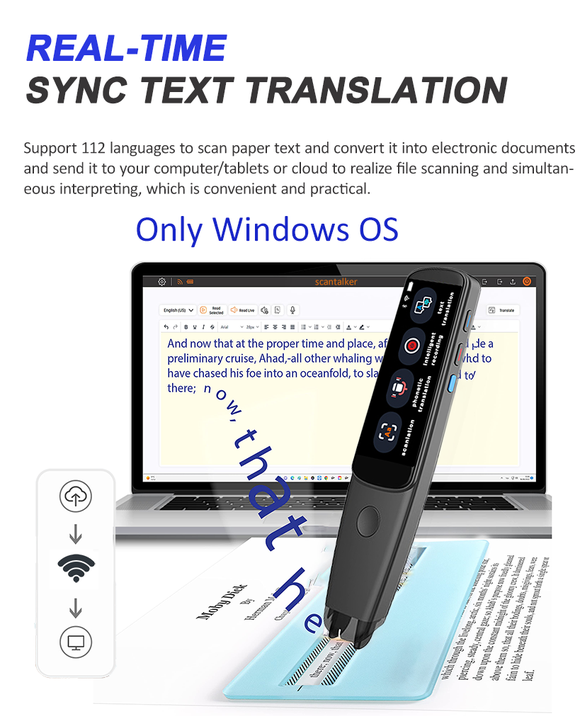
1. Turn on the Bluetooth of the mobile phone and the computer. By clicking the cloud upload logo, scanning the translation pen will display the IP, open the simultaneous interpretation software, and enter the corresponding "IP and Port" to realize the Bluetooth connection.
2. When you see the cloud upload sign "changing from × to √", it means that the pen is now discoverable and ready to be paired.
3. After connecting to the software of simultaneous interpretation, the scanning translation pen can realize the functions of scanning translation simultaneous interpretation, scanning simultaneous interpretation and recording simultaneous interpretation.
(1) Real-Time Sync Text Translation. With your pen connected, you should be able to use it to do simultaneous translations on your computer. This means that any text you scan with the pen is automatically translated and displayed on your computer screen.
(2) Text Excerpt. Click the text scanning function of the translation pen to scan multiple lines of multilingual text synchronously, and the scanning translation pen will appear synchronously. After scanning, click Save to save it as a txt file, click the upload button next door, and you can see your file on the computer screen. The function of synchronous scanning is very convenient for business working, student learning, reading and reviewing documents, etc.
(3) Intelligent Recording. This function is very suitable for business workers who often hold meetings or travel to record beautiful moments, voice and music. Turn on the recording function of the scanning pen, we can record and save the conversations with friends or superiors anytime and anywhere, and click the upload button next door to display it on the computer screen.
Connecting the translation pen to the computer via bluetooth is an easy process, and the scanning translation pen also supports 112 languages, which can help you take language learning to a new level, can help Business' meeting minutes, can help people with dyslexia better Reading and listening to articles can achieve barrier-free communication while traveling.
T02 Scan Translator Pen has more functions,only 2.98 inches so you can take it with you wherever you go.

Hot Tags: scanning simultaneous interpretation translator pen, manufacturers, suppliers, factory, wholesale, customized, New Voice Language Scanner Translation Pen, Xuezhiyou 3 46 Inch RV1109 Dictionary Pen, 3 46 Inch Portable Scan Voice Language Translation Device, Scan Translator 112 Voice Langauges Translation Tool, Smart Learning Tool Translation Tool, Xuezhiyou Scantalker Scan Voice Language Translator Pen 2 98 Inch


