




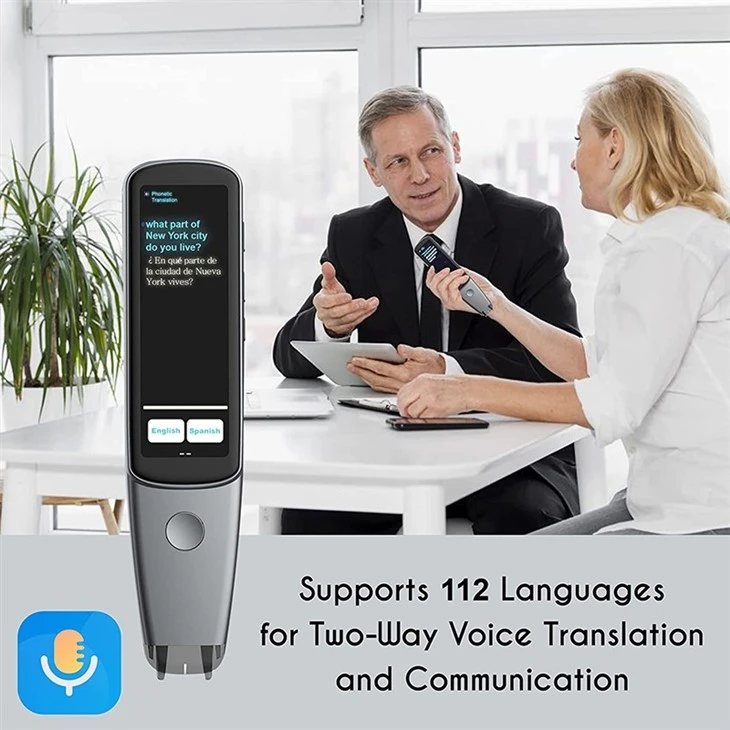


If you are interested in our experience the power of scan translation pen, welcome to wholesale the quality and convenient products with our factory. Shenzhen Xuezhiyou Technology Co., Ltd. is known as one of the leading educational products manufacturers and suppliers in China, we also offer the customized service with competitive price. Feel free to contact us for more information.
Experience the Power of Scan Translation Pen -
Transforming Work, Learning, and Healthcare!

The Scan Translation Pen is a revolutionary device that brings convenience, efficiency, and accuracy to your work, learning, and healthcare experiences. With its unique ability to seamlessly transmit translations to your Windows computer, this cutting-edge tool offers a multitude of benefits across various domains.
What is OCR?

Optical Character Recognition (OCR) is the process that converts an image of text into a machine-readable text format. For example, if you scan a form or a receipt, your computer saves the scan as an image file. You cannot use a text editor to edit, search, or count the words in the image file.
1. Image preprocessing In the OCR process, the input image first needs to be preprocessed. The purpose of preprocessing is to ensure that character edges are clearly visible and separated from the background. This step usually includes operations such as grayscale, binarization, and denoising. Grayscale is the process of converting a color image into a black and white image to make subsequent processing easier. Binarization converts each pixel in the image to 0 or 1, making the characters more distinct from the background. Denoising is the removal of insignificant details in an image, such as noise in the background or irrelevant edges.
2. Character segmentation After preprocessing, the image needs to be segmented. The purpose of character segmentation is to separate each character in the text to form a separate character image. This step usually uses image processing techniques, such as edge detection, contour tracking, etc., to identify and segment each character.
3. Feature extraction After character segmentation, geometric features need to be extracted from each character image. These features may include character width, height, outline shape, angle, etc. Common feature extraction methods include edge detection, contour tracking, and projection methods. Edge detection is a method of extracting features by finding edges in an image. Contour tracking tracks along the edges of characters to obtain more precise features. The projection rule is to project the image to a specific direction in order to obtain characteristics such as the width and height of the characters.
4. After extracting features through template matching, compare the extracted features with the character templates in the known font library. The font library stores geometric feature information of each character. Select the character template that best matches the input features by calculating a similarity measure such as Euclidean distance or correlation.
5. Character recognition and correction Finally, the characters in the input image are recognized through the character template with the highest matching degree. If the match is below a set threshold, it may indicate unrecognized characters or errors. In some cases, post-processing steps can also be performed, such as correcting character recognition errors or merging adjacent characters.
It should be noted that this geometry-based OCR technology is mainly suitable for printed characters and is sensitive to the size, font and distortion of the characters. With the development of computer vision and deep learning, OCR technology has adopted more complex models and algorithms, capable of processing a wider range of fonts and text types.
What is a Pen Scanner?

optical character recognition or OCR technology
A scanning pen or reading pen is a device about the size of a highlighter pen. It uses optical character recognition, or OCR, technology to take a picture of written text and convert it into digital text. Users can edit, translate or read text using the scanner software behind the pen.
The OCR scanning translator pen can convert scanned data into machine-encoded text so it can be easily edited (data can be instantly loaded into a text editor), automatically translated into another language, text-to-speech applications (useful for visual effects ) Impaired and blind users, as well as people with dyslexia (which is also a key factor in the development of artificial intelligence), and generally better preservation of data (e.g. old books, which require more time and work to survive) passing of the times).
simultaneous interpretation to PC
To use the Scantalker pen, you need to download the app/software, install it on your laptop, and link via Bluetooth to your local IP address. In the software, there are three functions to choose from, Real-Time Sync Text Translation, Text Excerpt, and intelligent Recording.
Any text you scan with the pen is automatically translated and displayed on your computer screen. At the same time, you can save your scanned files and copy Go to word or excel to modify and share and save. Intelligent recording, there are 112 languages that can be selected for translation.
When you record the files in the meeting, you can synchronize the transfer to the laptop, translate and save.

1. Streamline Work Processes: In the workplace, time is precious. The Scan Translation Pen enables you to effortlessly scan documents, contracts, and important papers, instantly transmitting the translated content to your Windows computer. This feature eliminates the need for manual typing or data entry, saving you valuable time and boosting productivity.
2. Enhance Learning and Language Acquisition: For students and language enthusiasts, the Scan Translation Pen is a game-changer. By scanning textbooks, articles, or any printed material, you can instantly translate the text and have it seamlessly transmitted to your Windows computer. This facilitates language learning, comprehension, and vocabulary expansion, making it an invaluable tool for students of all levels.
3. Improve Medical Communication: In the healthcare field, effective communication is vital. The Scan Translation Pen bridges language barriers, allowing medical professionals to communicate with patients who speak different languages. By scanning medical documents, prescriptions, or patient records, the pen provides accurate translations that can be effortlessly transferred to your Windows computer. This promotes efficient and precise medical care, leading to improved patient outcomes.
4. Facilitate Multilingual Collaboration: In today's globalized world, businesses often collaborate with international partners and clients. The Scan Translation Pen simplifies communication by instantly translating multilingual documents, emails, or presentations, and seamlessly transmitting them to your Windows computer. This feature allows for smooth collaboration with colleagues from different language backgrounds, fostering teamwork and enhancing global business interactions.
5. Increase Accessibility and Inclusivity: The Scan Translation Pen promotes accessibility for individuals with different language abilities. By transmitting translations directly to your Windows computer, it enables people to access and understand content in their native language. This inclusivity empowers individuals to participate fully in various settings, whether it's in classrooms, workplaces, or healthcare environments.
6. Enhance Efficiency in Legal and Administrative Tasks: Legal and administrative professionals deal with extensive documentation. The Scan Translation Pen simplifies these tasks by scanning legal documents, contracts, or administrative forms and transmitting the translated text directly to your Windows computer. This ensures accuracy, consistency, and efficiency in document processing, saving time and reducing the risk of errors.
Experience the power and versatility of the Scan Translation Pen. Unlock new levels of efficiency, accuracy, and convenience in your work, learning, and healthcare endeavors. Embrace this innovative tool and revolutionize the way you communicate and interact across languages, with seamless translations transmitted directly to your Windows computer.
Hot Tags: experience the power of scan translation pen, manufacturers, suppliers, factory, wholesale, customized, Arabic Translator Scan Voice Translation Tool, XUEZHIYOU Scantalker OCR Scan Reading Translator, Readers Favorite Scanning Translation Pens, Multi language Portable Scan Text Voice Translator, Recognize OCR Pen Translation, 3 46 Inch Portable Scan Voice Language Translation Device


